Dynamic Dashboard & Filters
By Tech MahindraAdmin & Developer Tools
- Rating
- 4.0
- Reviews
- 4
- Pricing
- Free
- Listed since
- 2023
About Dynamic Dashboard & Filters
More than your traditional Dashboard
Tech Mahindra's Solution Dynamic Dashboard and Filter will offer dynamic report filtering at run time on Dashboard level. Reports need to be created in Specific Folders for Dynamic Dashboard and Dashboard will be auto created. Summarized Reports with Charts will be filtered based on user’s selection of relative dates e.g. ‘This Month’, ‘Last Month’, ’This Quarter’ etc to see the filtered result in charts. Also Eliminates the issue that OOTB Salesforce Dashboards have in terms of limited licenses of run as specific user / run as me. e.g. Case Status, Opportunity Stage, Lead Status.
Post Installation steps:
- Once you successfully install the package, you would see the dynamic dashboard folder created in All folders.
- Create Summary or matrix report on any object ex: Case, lead.
- Add these reports to dynamic dashboard folder created earlier.
- Go to AppLauncher and select Dynamic Dashboard App, now you would see your reports in dashboard with runtime filters.
Highlights
- Dynamic Filters
- Reports & Dashboards
- Dynamic Dashboards
- Aesthetic Dashboards
- Easy to use
- Just upload reports and see the magic happen
Screenshots and videos
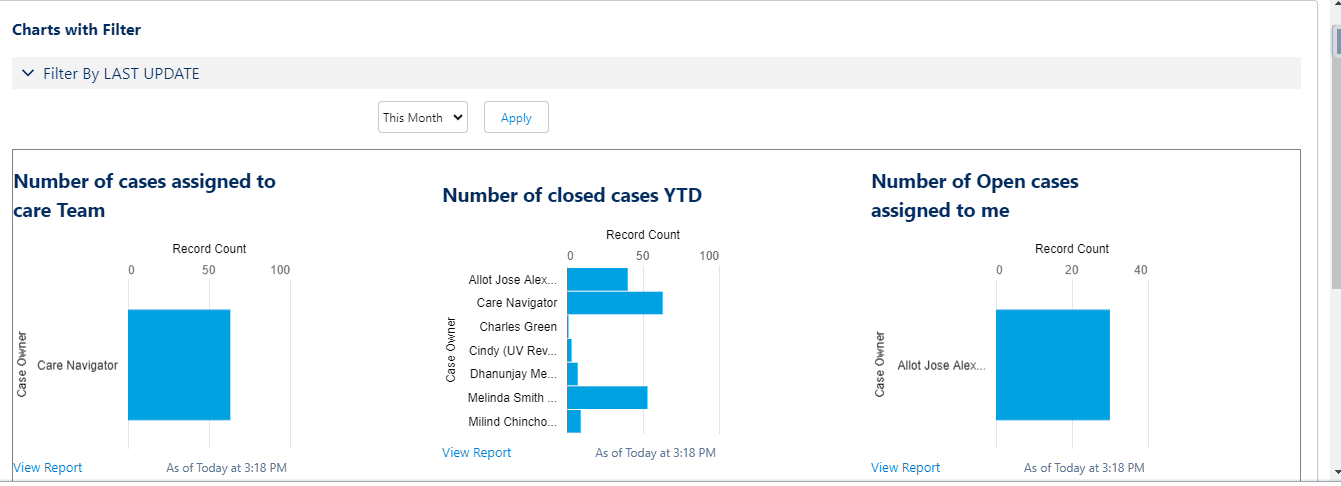
Image 1 of 4
Pricing
Free.
Compatibility
- Works with
- Sales Cloud
- Service Cloud
- Marketing Cloud
- Requires
- Platform Cloud
- Salesforce editions
- Essentials
- Professional
- Enterprise
- Unlimited
- Performance
- Developer
- Lightning Experience
- Supported
- Salesforce mobile app
- Not supported
- Salesforce security review
- Passed on September 1, 2023
- Industries
- Horizontal Product
- Languages
- English
More Admin & Developer Tools apps
The most reviewed Admin & Developer Tools apps on the AppExchange, to compare before you choose.