DriveMate
Google Drive, Docs & Sheets for Salesforce
By PRAXXY
- Rating
- 5.0
- Reviews
- 2
- Pricing
- Paid
- From $5 per user per month
- Listed since
- 2023
About DriveMate
Automate Google Drive, Docs & Sheets in Salesforce
AUTOMATE GOOGLE DRIVE, DOCS, AND SHEETS FROM SALESFORCE DriveMate helps teams create, organize, and manage Google Drive files, folders, Google Docs, and Google Sheets directly from Salesforce. Replace manual file work with automated workflows connected to Accounts, Opportunities, Cases, and custom objects.
REDUCE MANUAL WORK AND SALESFORCE FILE STORAGE PRESSURE Keep files in Google Drive while managing them from Salesforce records. Automatically create the right folder structure, upload files to the correct location, and help teams avoid unnecessary Salesforce file storage growth.
GENERATE BUSINESS DOCUMENTS FROM SALESFORCE DATA Create contracts, proposals, invoices, onboarding documents, and other Google Docs from reusable templates. Populate merge fields, use Salesforce formulas, show or hide conditional sections, add related-record tables, and calculate rollups such as SUM, COUNT, AVG, MIN, and MAX.
BUILT FOR FLOW, APEX, AND REAL BUSINESS PROCESSES Use DriveMate in record pages, Screen Flows, record-triggered flows, and custom Apex automation. Automate Google Drive folder creation, file search, file uploads, document generation, and Google Sheets workflows without building a
Highlights
- Google Drive Folder Automation: Automatically create and link Google Drive folders from Salesforce records such as Accounts, Opportunities, Cases, or custom objects.
- Files Managed From Salesforce: View, upload, search, and manage Google Drive files directly from Salesforce record pages without moving files into Salesforce storage.
- File Uploads in Screen Flows: Let users upload files to the right Google Drive folder from guided Salesforce Screen Flows.
- Google Docs Generation: Generate contracts, proposals, invoices, and other Google Docs from Salesforce data and reusable templates.
- Dynamic Templates: Use merge fields, formulas, conditional sections, related-record tables, and rollups inside generated Google Docs.
- Google Sheets Automation: Create or update Google Sheets from Salesforce data for exports, reports, operational tracking, and spreadsheet-based workflows.
- Flow and Apex Actions: Automate Google Drive, Google Docs, and Google Sheets workflows with Salesforce Flow and Apex actions.
- Reduce File Storage Pressure: Keep documents in Google Drive while managing them from Salesforce, helping teams reduce Salesforce file storage growth.
- Avoid Custom Google Integrations: Avoid building and maintaining custom Salesforce-Google integrations for common file, folder, document, and spreadsheet workflows.
Screenshots
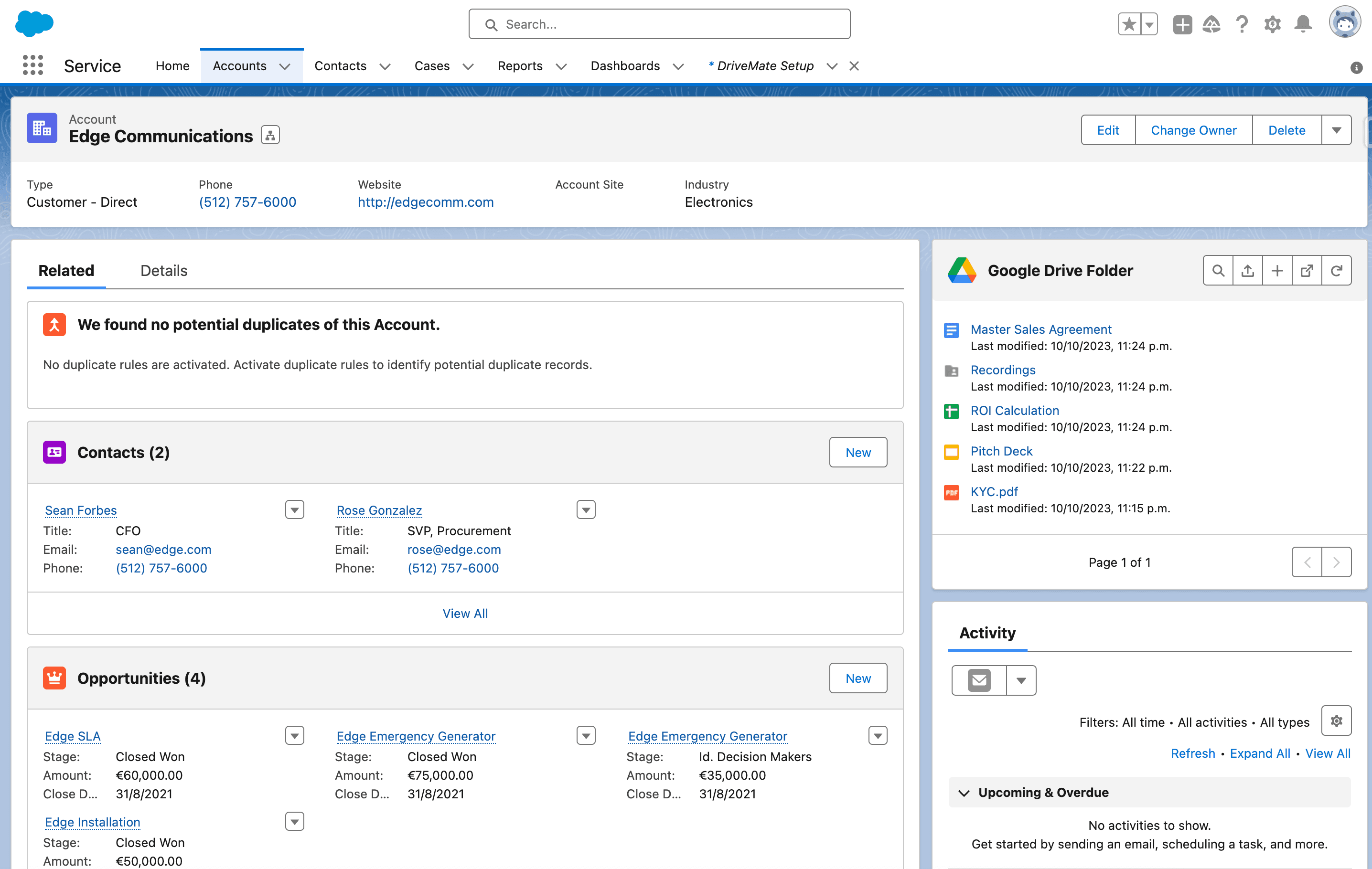
Image 1 of 2
Pricing
Paid, from $5 per user per month.
| Plan | Price | Billed | Free trial |
|---|---|---|---|
| Starter | $5 per user | Monthly | 30 days |
One simple per-user plan includes all DriveMate features. No feature tiers or required add-ons.
The publisher offers discounts.
Compatibility
- Works with
- Sales Cloud
- Platform Cloud
- Experience Cloud
- Salesforce editions
- Enterprise
- Unlimited
- Performance
- Developer
- Lightning Experience
- Supported
- Salesforce mobile app
- Not supported
- Salesforce security review
- Passed on November 17, 2023
- Languages
- English