Maxio
By Maxio previously ChargifyAccounting
- Rating
- Not rated yet
- Reviews
- No reviews yet
- Pricing
- Paid
- From $20 per user per month
- Listed since
- 2021
About Maxio
Maxio + Salesforce: Built for B2B SaaS
The Maxio for Salesforce integration provides a two-way sync which allows you to push data from Maxio to Salesforce and vice versa.
- Create customers and subscriptions
- Update payment information
- Change product (prorated or non-prorated)
- Cancel or reactivate
- Allocate components
- Add or update custom field values
- View Historical Transactions
- Create subscriptions from Salesforce CPQ Quote
- And much more ...
Highlights
- Go to market the way you want. Maxio allows you to test different billing and pricing models out-of-the-box, including variable, multi-attribute, stair-step, and more to create a seamless experience for your customers.
- Ensure that your customers don’t churn because of late, failed or missing payments. Utilize Maxio’s collections and dunning capabilities to keep your customers around for the long term.
- Maxio provides full visibility into your products performance and helps you identify which products and customer cohorts are contributing most to your bottom line. Make more informed decisions and avoid any stagnation in your pricing models over time.
Screenshots
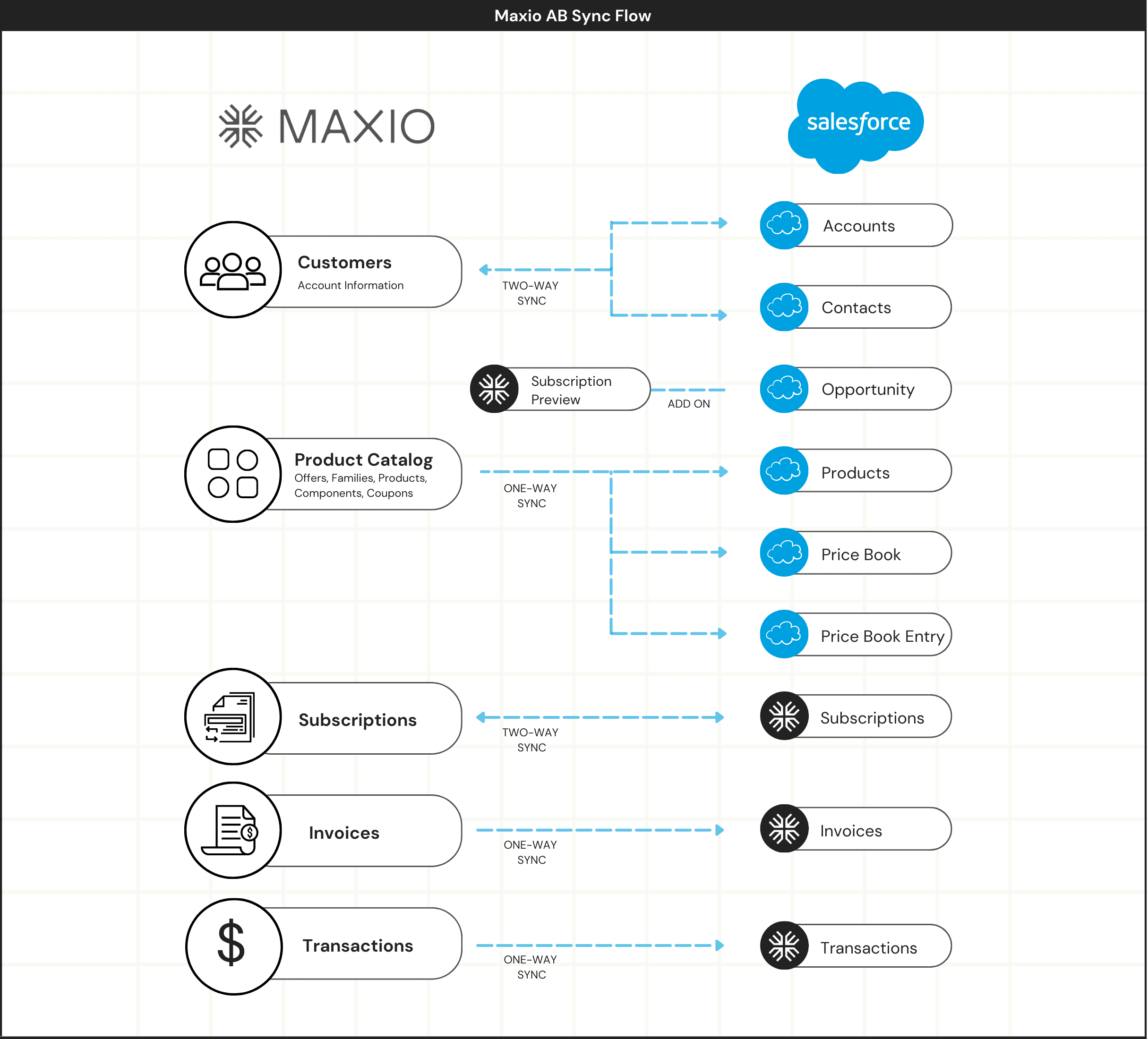
Image 1 of 10
Pricing
Paid, from $20 per user per month.
| Plan | Price | Billed |
|---|---|---|
| Default Plan | $20 per user | Monthly |
Compatibility
- Works with
- Experience Cloud
- Revenue Cloud CPQ
- Requires
- Sales Cloud
- Salesforce editions
- Professional
- Enterprise
- Unlimited
- Developer
- Lightning Experience
- Supported
- Salesforce mobile app
- Not supported
- Salesforce security review
- Passed on February 25, 2021
- Languages
- English
More Accounting apps
The most reviewed Accounting apps on the AppExchange, to compare before you choose.