Flexible Team Share
Team Members & Record Sharing for Any Salesforce Object
By Tucario
- Rating
- 5.0
- Reviews
- 1
- Pricing
- Free
- Listed since
- 2026
About Flexible Team Share
Extend Account Team functionality to any standard or custom object
Salesforce ships three separate team features: Account Teams, Opportunity Teams and Case Teams. Each one works on exactly one object, each has its own model, and everything else — Contacts, Leads, Campaigns, Orders, custom objects — has none.
Flexible Team Share gives every object the same thing. Add team members directly on record pages with a configurable Lightning component. Assign roles (Owner, Manager, User), set access levels (Read Only, Read/Write), and optionally set an expiration date for temporary assignments.
Record sharing follows team membership automatically. Under the hood it is Apex Managed Sharing with a proper sharing reason — the same thing you would otherwise build in code — but you configure it point-and-click. No manual shares, no sharing rules to maintain, no Apex for your admins to own. Works with Private and Public Read Only org-wide defaults.
Setup takes minutes with a no-code Configuration Wizard that walks admins through enabling objects and scheduling cleanup jobs. The app runs entirely inside Salesforce — no external integrations, no callouts, no data leaving your org.
Supports 13 languages out of the box
Highlights
- TEAMS ON EVERY OBJECT Salesforce ships Account Teams, Opportunity Teams and Case Teams — three features, three objects. Flexible Team Share puts the same team model on Contacts, Leads, Campaigns, Orders and any custom object you have.
- APEX MANAGED SHARING WITHOUT THE APEX Creates the same managed share records you would otherwise build in code, complete with a sharing reason — configured point-and-click. No sharing rules to maintain, no trigger to own, no Apex for your admins.
- ROLE-BASED ACCESS Assign every member a role — Owner, Manager or User — and an access level of Read Only or Read/Write. Access follows team membership automatically: remove the member and the share goes with them, on every object.
- TEMPORARY ASSIGNMENTS WITH AUTO-EXPIRATION Set an end date when you add someone for a covering shift, an audit or a short project. A scheduled cleanup job removes the share on time, so temporary access never quietly becomes permanent access.
- NO-CODE CONFIGURATION WIZARD The wizard walks admins through enabling objects, configuring roles and scheduling cleanup jobs. Drop the Lightning component onto any record page in Lightning App Builder. Setup in minutes, no deployment, no code.
- WORKS WITH YOUR SHARING MODEL Built for Private and Public Read Only org-wide defaults — the models where record access actually has to be managed. Sits alongside role hierarchy, sharing rules and manual sharing instead of fighting them.
- 100% NATIVE — NOTHING LEAVES YOUR ORG No external integrations, no callouts, no middleware, no data leaving Salesforce. Managed package checked by Salesforce Code Analyzer on every release and approved in the AppExchange security review.
- FREE, WITH NO LIMITS Unlimited objects, unlimited teams, unlimited members — free. No seat count, no edition tier to upgrade to, and no paid add-on waiting behind the install button once you have it running.
- 13 LANGUAGES OUT OF THE BOX Packaged with translated labels, so roles and access levels read correctly for every user in a multi-language org. Available for Professional, Enterprise, Performance, Unlimited and Developer editions.
Screenshots
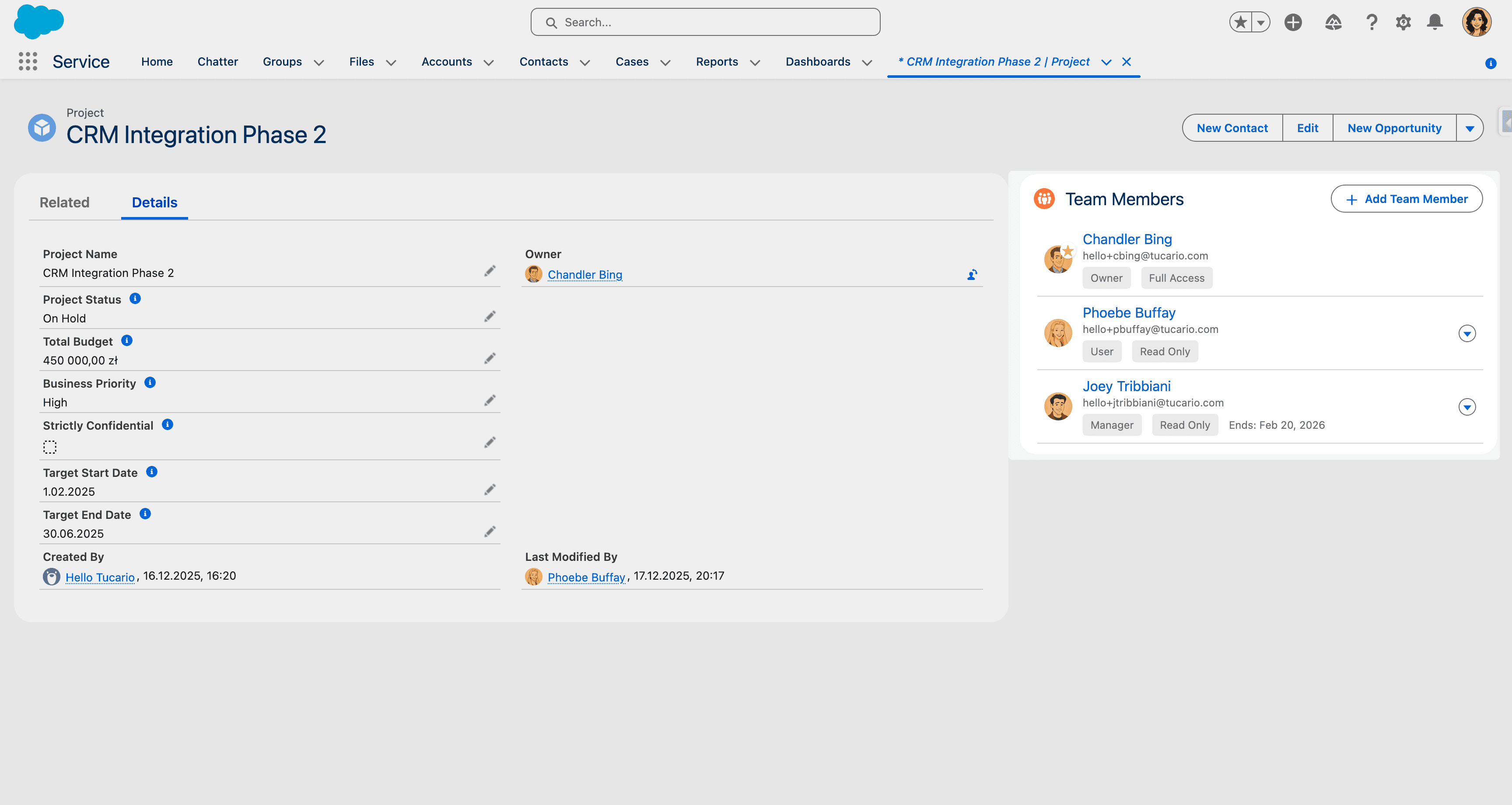
Image 1 of 5
Pricing
Free.
Compatibility
- Works with
- Sales Cloud
- Service Cloud
- B2B Commerce Cloud
- Salesforce editions
- Professional
- Enterprise
- Unlimited
- Performance
- Developer
- Lightning Experience
- Supported
- Salesforce mobile app
- Not supported
- Salesforce security review
- Passed on May 26, 2026
- Industries
- Horizontal Product
- Financial Services
- Professional Services
- Languages
- Arabic
- Dutch
- English
- Finnish
- French
- German
- Danish
- Italian
- Japanese
- Korean
- Portuguese
- Spanish
- Swedish