Enhanced Approval Requests Free
By Forcelution AppsCollaboration
- Rating
- 4.4
- Reviews
- 31
- Pricing
- Free
- Listed since
- 2020
About Enhanced Approval Requests Free
Approve, reject, or reassign multiple Flow or Classic approval requests
Enhance and streamline your approval management process with Enhanced Approval Requests Free.
Installation: 1) Hide standard Approval Requests tab. 2) Install Enhanced Approval Requests Free (for Admins only). 3) Assign 'Enhanced Approval Requests' permission set to users. 4) Add 'Items to Approve (enhanced)' to your home page. 5) Optionally, configure the columns, actions and approval request types (see installation guide).
Free Version Features:
- Displays pending approval requests assigned to the user or to any queues the user is part of.
- Up to 50 requests can be processed (approved, rejected, or reassigned) at once.
- Up to 2000 requests can be processed in total per organization per month.
- Includes in-app showcases for Enhanced Approval Requests Pro.
- Enjoy a 30-day free trial of Pro features to experience advanced capabilities, including custom approval list views with related objects fields, quick filters, and more.
Upgrade to Enhanced Approval Requests Pro for powerful capabilities and uninterrupted access to advanced features to optimize approval management for your organization. See https://appexchange.salesforce.com/appxListingDetail?listingId=a0N3u00000ONZPQEA5
Highlights
- PROCESS FLOW AND CLASSIC APPROVAL REQUESTS Work seamlessly with both Flow and Classic approval processes. The app detects the type and allows users to approve, reject, or reassign requests, regardless of the approval process type.
- MASS APPROVE, REJECT, OR REASSIGN Select up to 50 approval requests, optionally provide any comments, and approve, or reject them all in one go. Configure which Approval Request columns should be shown, such as the submitter or most recent actor.
- CONFIGURABLE VISIBILITY WITH APP BUILDER Easily control how the approval component appears on the home page using the App Builder. Adjust visibility and choose to automatically hide the component when there are no items to approve.
Screenshots
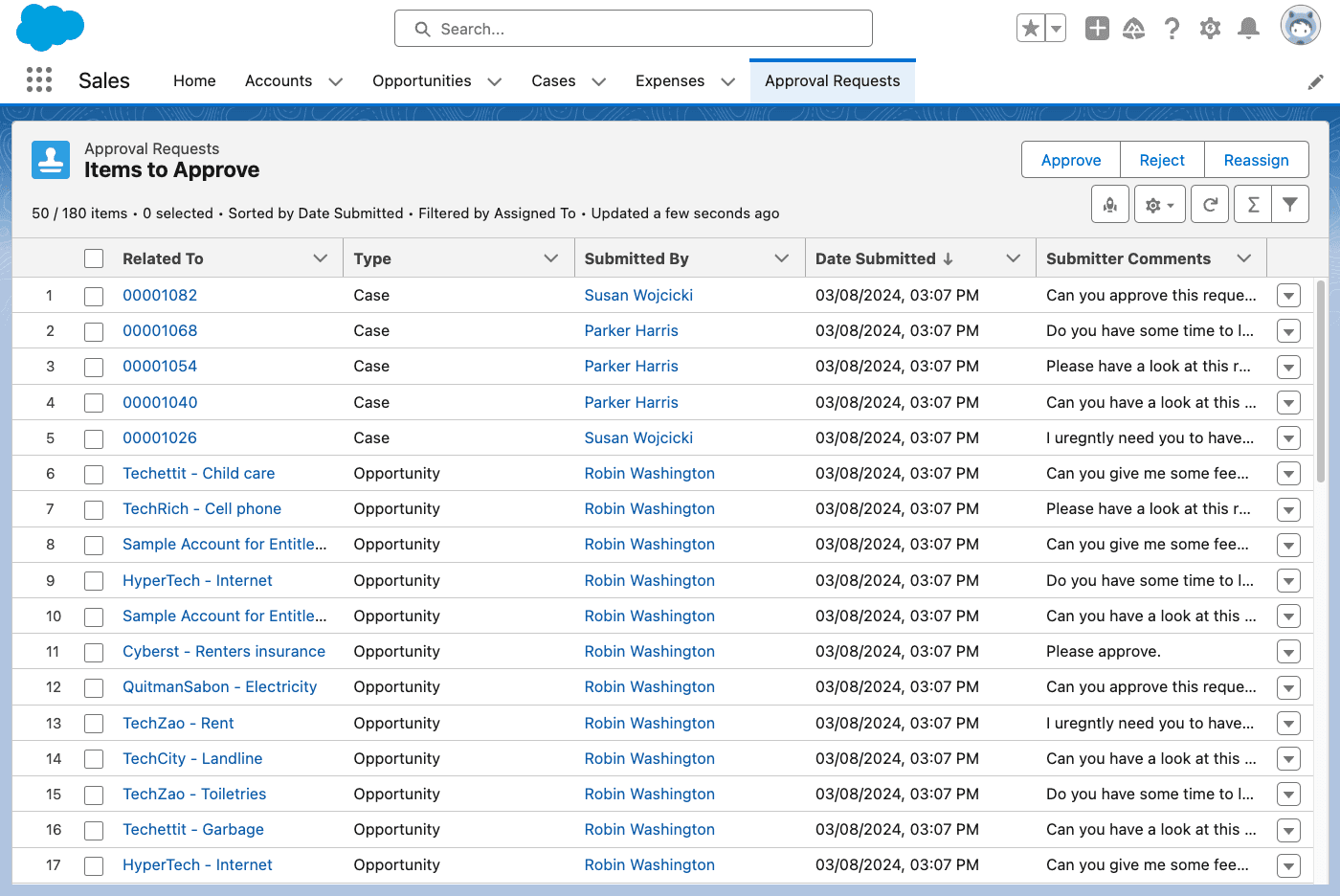
Image 1 of 9
Pricing
Free.
Compatibility
- Works with
- Health Cloud
- Government Cloud
- Manufacturing Cloud
- Requires
- Sales Cloud
- Service Cloud
- Platform Cloud
- Financial Services Cloud
- Salesforce editions
- Enterprise
- Unlimited
- Performance
- Developer
- Salesforce Platform
- Lightning Experience
- Supported
- Salesforce mobile app
- Supported
- Salesforce security review
- Passed on March 31, 2020
- Industries
- Horizontal Product
- Financial Services
- Professional Services
- Languages
- Dutch
- English
- French
- German
- Italian
- Portuguese
- Spanish
More Collaboration apps
The most reviewed Collaboration apps on the AppExchange, to compare before you choose.