Aress Record Merge Tool
By Aress Software and Education Technologies P Limited
- Rating
- 2.0
- Reviews
- 2
- Pricing
- Free
- Listed since
- 2024
About Aress Record Merge Tool
Unify Your Data With Ease
The Aress Record Merge Tool empowers administrators with a streamlined solution to tackle duplicate records effectively, ensuring data accuracy and enhancing organizational efficiency. By providing intuitive functionalities for identifying, merging, and managing duplicate records across various objects, the tool enables administrators to maintain a clean and organized database within their Salesforce environment. With its user-friendly interface and comprehensive merging capabilities, the Record Merge Tool simplifies the process of consolidating duplicate data, thereby saving time and resources while promoting data integrity and reliability.
Highlights
- Duplicate Record Identification: This can be accomplished through manual review of records or leveraging tools or queries to uncover potential duplicates.
- Dynamic Object and Field Choice: Users have the flexibility to select Salesforce objects and fields dynamically using intuitive picklists. The options for objects and fields are generated dynamically, providing flexibility in selecting records.
- Conditional Querying: The component facilitates condition-based querying, enabling users to define criteria for retrieving records. It offers range of conditions such as Equal To, Not Equal To, Starts With, Ends With, and Between for accurate data.
- Customizable Merge Queries: Empowers administrators to create personalized merge queries, prioritizing data retention to safeguard critical information throughout the merging procedure.
- Merge Preview and Review: Delivers a thorough preview of duplicate records alongside their associated data prior to merging, empowering administrators to scrutinize and validate merge actions, thus mitigating the risk of data loss.
- Bulk Merge Functionality: Enables administrators to efficiently merge duplicate records in bulk across multiple objects, streamlining the consolidation process for enhanced efficiency.
- Intuitive User Interface: The component provides an interactive user interface featuring options to select child objects and customize query conditions. Users can effortlessly navigate through the UI to choose, filter, and query records.
Screenshots
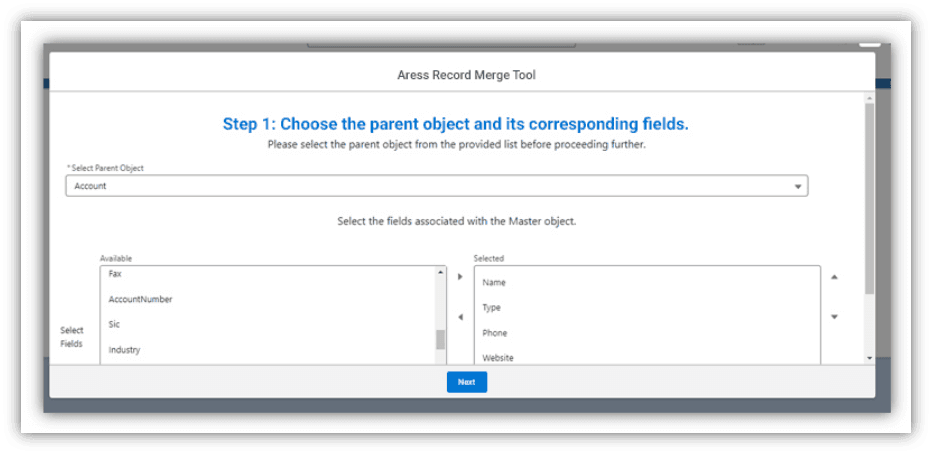
Image 1 of 7
Pricing
Free.
Compatibility
- Works with
- Sales Cloud
- Service Cloud
- Revenue Cloud
- Requires
- Platform Cloud
- Salesforce editions
- Essentials
- Professional
- Enterprise
- Unlimited
- Developer
- Lightning Experience
- Supported
- Salesforce mobile app
- Not supported
- Salesforce security review
- Passed on September 27, 2024
- Languages
- English